
Local recognition
SendsNothing
Recognition runs inside Voltip on a model file on your disk. The only network use is downloading the model, which is verified against a SHA-256 hash.
The text appears at your cursor, in any app. Recognition runs on your computer or with a cloud service you choose, and AI polish can tidy it first.
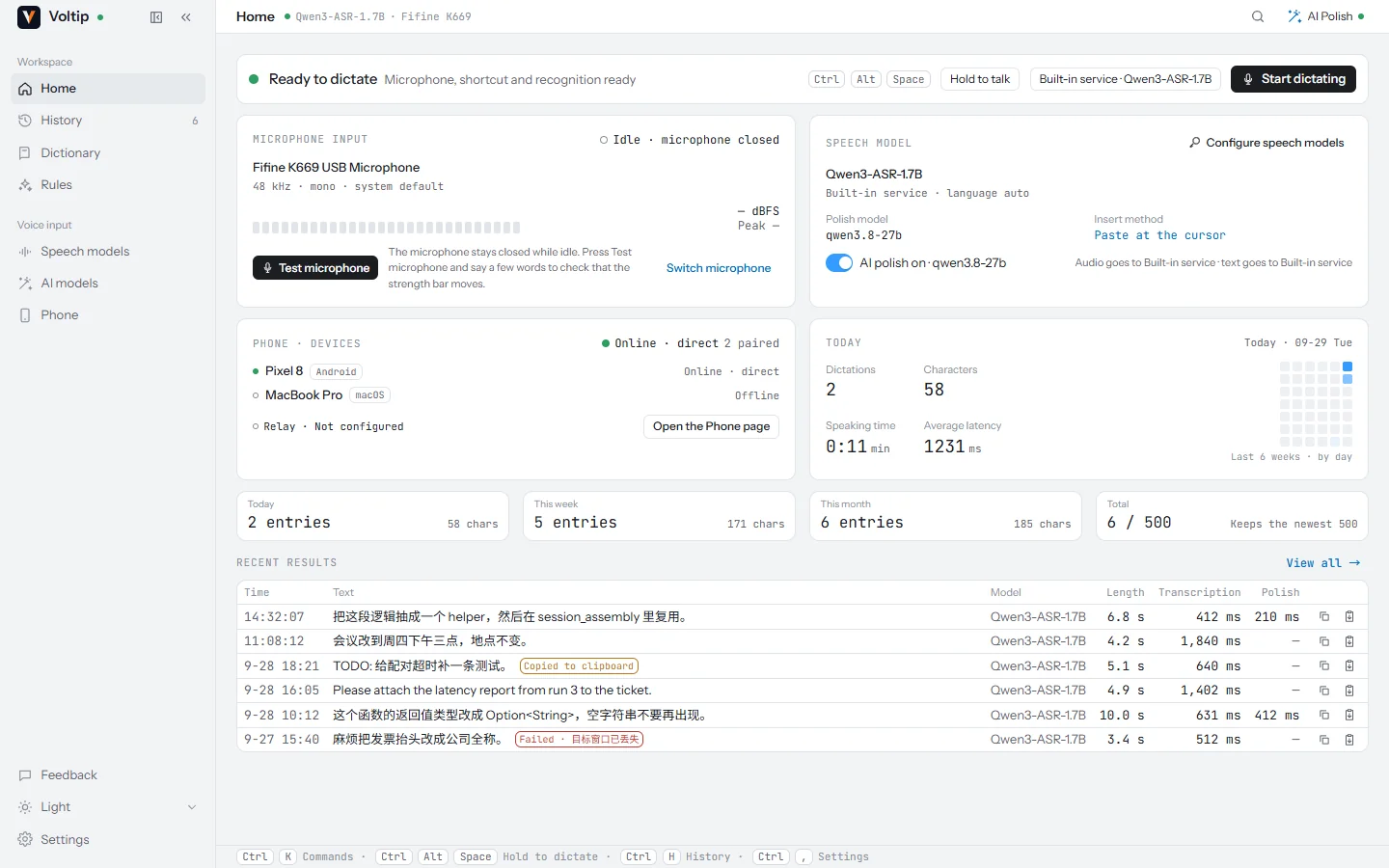
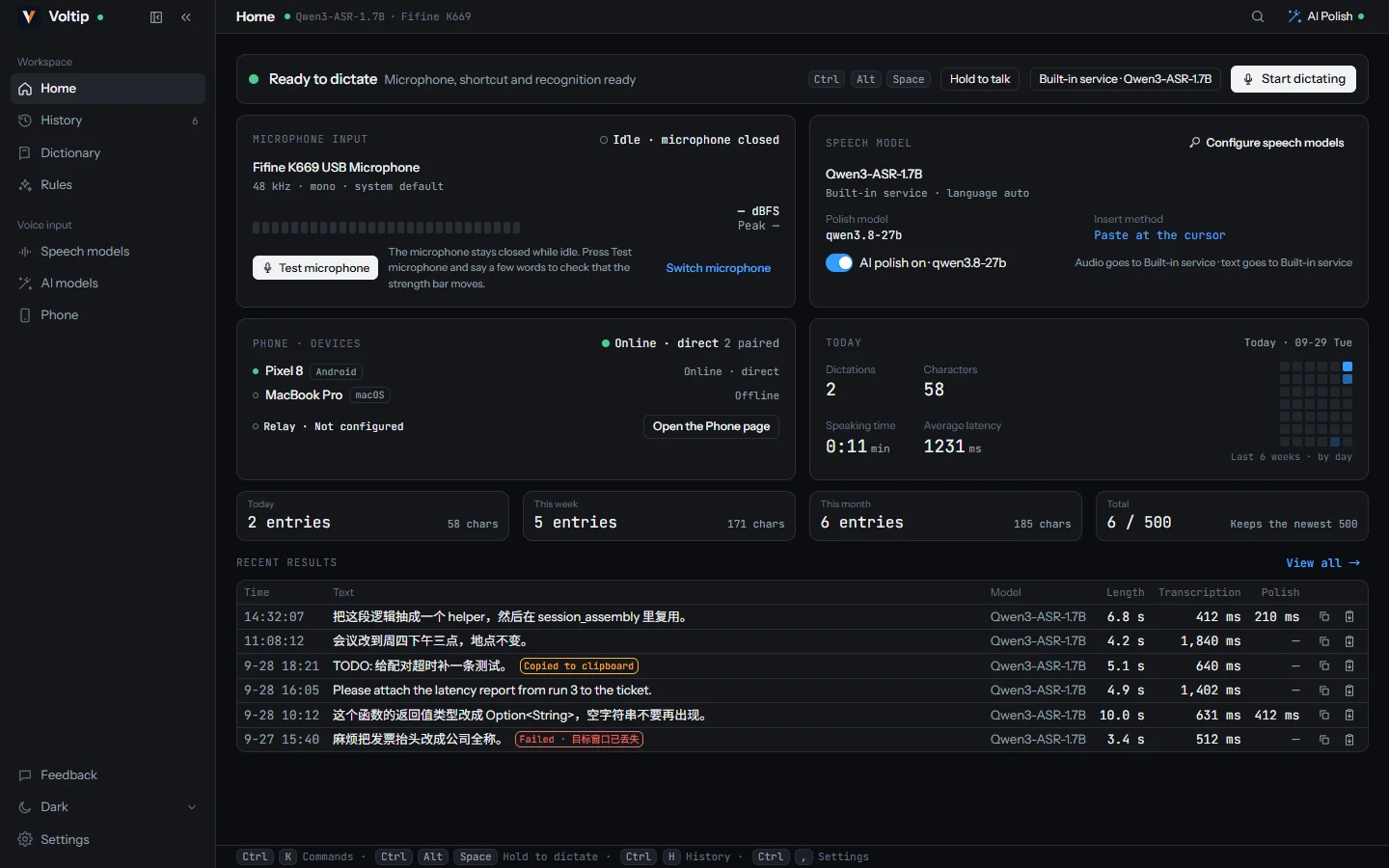






Every feature at a glance. Features marked "In development" are being built and are not in a release yet.
Hold Ctrl+Alt+Space, speak and release. You can also press once to start and again to stop, or lock a long take with a short press.
Right Ctrl, Right Alt, the Fn key on a Mac or a mouse side button can start dictation on their own.
The overlay shows the words as they are recognised. The text can be inserted all at once, sentence by sentence, or as you speak.
Select text, hold Ctrl+Alt+E and say what to change, such as "make it more formal" or "translate into English". The selection is replaced in place.
Qwen3-ASR, SenseVoice and Paraformer run on your computer. Once a model is downloaded, no audio leaves it.
Qwen3-ASR uses the graphics card through Vulkan on Windows and Linux and Metal on macOS, and the processor otherwise.
Release packages include a default service. OpenAI, Groq, SiliconFlow or any OpenAI-compatible endpoint can be used with your own key.
Fixes punctuation, typos and filler words without changing what you said. Works with the default service, your own provider or a local Ollama.
Teach Voltip your names and terms, and rewrite phrases with literal or regular-expression rules. Chinese can be written in Simplified or Traditional characters.
The app you speak into can choose the polish style, the output mode, the language and extra instructions for the AI.
Proofread, prompt, intent, chat, translation and notes presets, switched from the home page, the title bar or the tray, plus ready-made scenes for coding, office writing, chat and professional fields.
Pair an Android phone by QR code, a 6-digit code or a tap on the same network. Hold to talk or type on the phone, and the text appears at the computer's cursor.
Every result is kept on your computer. Search it, copy a result, or paste it into the window you used before.
Words dictated, words corrected and time saved, by day, week and month.
Up to two hours per recording, from the microphone, the computer's own audio or both, with export to SRT subtitles.
CtrlAltSpace
The microphone opens only now. The overlay at the bottom of the screen shows the input level.
With the live transcription model installed, the words appear in the overlay as you say them.
The speech is recognised, corrected with your dictionary, polished by AI if you want, and rewritten by your rules.
Voltip pastes the text into the app you were using and keeps a copy in the history. Esc cancels at any point.
Download a model once and dictation works offline. Qwen3-ASR recognises 30 languages and writes the punctuation itself; SenseVoice and Paraformer are small and fast on any processor. When the computer has a graphics card, Qwen3-ASR runs on it through Vulkan or Metal, and on the processor otherwise.
Release packages also include a default cloud service, so dictation works before you set anything up. You can switch to OpenAI, Groq, SiliconFlow or any OpenAI-compatible endpoint with your own key at any time.
| Model | Size | Languages | Runs on |
|---|---|---|---|
| Qwen3-ASR 0.6BRecommended | 690 MB | 30 languages, detected automatically | GPU or CPU |
| Qwen3-ASR 1.7BMost accurate | 1.7 GB | 30 languages, detected automatically | GPU or CPU |
| SenseVoice SmallSmallest download | 240 MB | Chinese, English, Japanese, Korean, Cantonese | CPU |
| ParaformerNo punctuation | 227 MB | Chinese, including dialects, mixed with English | CPU |
| Live transcriptionPreview while you speak | 169 MB | Chinese and English | CPU |
Downloads resume after an interruption and are checked against a SHA-256 hash before use. On an NVIDIA L40S, Qwen3-ASR 0.6B recognised 16 seconds of Chinese speech in 0.16 s on the GPU and in 2.87 s on 8 processor threads.
Recognition gets the words; the next steps make them read right. The dictionary corrects the names and terms a recogniser tends to mishear. AI polish removes filler words and fixes the punctuation. Replacement rules rewrite phrases exactly as you specify, and scenes adjust all of this to the app you are writing in.
Presets are in development In development: choose between proofreading, prompt writing, intent, chat, translation and notes from the home page, the title bar or the tray.
Recognised
um so I think we should uh ship the fix on friday and then update the docs next week
Inserted at your cursor
I think we should ship the fix on Friday and then update the docs next week.
An example of AI polish. Filler words are removed and the punctuation is fixed; the wording stays yours.
Pair an Android phone with the computer and hold to talk on the phone. The computer recognises the speech with its own settings and inserts the text at its cursor. The phone can also send typed text or its clipboard.
The Android app is built and tested but not released yet. It will be on the releases page once it is. How the phone works
Voltip is the same app on all three desktop systems. The platform notes list what differs between them.
| Platform | Packages | Shortcut and single key | Local recognition | GPU |
|---|---|---|---|---|
| Windows 10 and 11Available | Per-user installer or portable zip, x64 | Both | Yes | Vulkan |
| macOS 11 or laterAvailable | A dmg for Apple silicon and one for Intel | Both, with the Accessibility permission | Yes | Metal |
| LinuxAvailable | .deb or AppImage, x64; X11 and Wayland | Both on X11; on Wayland, a system shortcut runs the toggle command | Yes | Vulkan |
| AndroidIn development | Not released yet | Hold to talk in the app | Done by the paired computer | — |
iOS has not been started. Packages for Windows on ARM and Linux on ARM are not planned for now.
It depends on the services you choose. The home page and the Speech models page always show which one is in use.
SendsNothing
Recognition runs inside Voltip on a model file on your disk. The only network use is downloading the model, which is verified against a SHA-256 hash.
SendsAudio, to the service you chose
The recording goes to the built-in service or to the provider you set up, with your key and, if you keep a dictionary, its terms as a hint. Keys are kept in the system keychain.
SendsText, to the AI service you chose
The recognised text, or for voice edit the selection and your instruction. The app's name is included unless you turn it off; the window title only if you turn it on. Audio is never sent.
One command picks the right package for the computer, checks it against the release's SHA256SUMS and installs it.
irm https://raw.githubusercontent.com/sunerpy/voltip/main/scripts/install.ps1 | iexcurl -fsSL https://raw.githubusercontent.com/sunerpy/voltip/main/scripts/install.sh | shPackages for every platform, checksums and build attestations are on the releases page. The install guide covers each platform, including the first start on a Mac.
The next releases, in the expected order. No dates are promised; each feature is described on this site once it ships.
The default Proofread preset fixes typos and punctuation, removes filler words, and keeps only the corrected wording when you correct yourself. Further presets cover prompts, intent, chat, translation between Chinese and English, and notes; you can also write your own.
The history limit rises from 500 to 20,000 entries, and the home page shows words dictated, words corrected and time saved by day, week and month. Time saved is speaking time × 1.9, based on Ruan et al. 2016.
Recordings of up to two hours from the microphone, the computer's own audio or both. Long recordings are recognised in segments and can be exported as SRT subtitles.
Using the phone as a microphone and keyboard is built and tested. The app is being prepared for release.
Text while you speak currently uses the local live transcription model. Streaming results from cloud services are planned.
Whisper among others, and measurements on AMD and Intel graphics cards.